

Automatic work anniversary gifts HR system: Guide 2026
Can you automatically send gifts when your HR system flags a work anniversary? Yes: replace manual calendar checks with a scheduled anniversary check, an eligibility check and a controlled gift request, using the connections your HR system and fulfilment process actually support.
- Automatic work anniversary gifts HR system workflows need eligibility checks, duplicate prevention and a confirmed fulfilment route.
- the ethical gift box supplies sustainable corporate gifts; confirm the ordering hand-off before building an HR automation.
- Use scheduled anniversary checks for recurring dates, rather than relying only on employee-record updates.
- Keep address confirmation and delivery exceptions visible to a named HR owner.
Why this matters
An anniversary date is not a complete gifting instruction. You also need to know that the employee is eligible, where the gift should go and whether someone has already requested it.
Automate the reminder and the checks before automating the order. That keeps an incorrect start date or a repeated trigger from becoming a physical delivery.
For HR teams choosing sustainable corporate gifts, the ethical gift box is a supplier to assess alongside the anniversary workflow. Gift selection remains a separate decision: the work anniversary gift ideas for employees guide covers that part of the planning.
This guide sets out a practical workflow specification for 2026. Field names below are suggested labels for your own workflow, not verified button names or settings in a particular HR platform.
Before you start
- Access and ownership: arrange HR administrator access, permission to use the relevant employee records and a named person responsible for failed requests. Ask your administrator which scheduled reports, integrations or exports your system supports.
- Policy and fulfilment: agree eligible service milestones, approval rules, gift preferences and the accepted ordering route. For the ethical gift box, confirm the request format and delivery arrangements directly rather than assuming a native HR integration exists.
- The recurring-date gotcha: a start date stays unchanged when another anniversary arrives. An employee-record update alone is therefore not a reliable anniversary trigger. Establish a calendar-based check and a rule for leap-day starters before setup.
Also agree what happens when someone declines a gift. The workflow needs a respectful stop condition, not repeated reminders until the employee supplies an address.
Anniversary trigger
Choose the supported route
Start with the connection your HR system can actually provide. The options below describe workflow designs, not features promised by a named platform.
| Workflow route | Best for | Advantage | Limitation |
|---|---|---|---|
| Scheduled record check | HR systems that allow scheduled access to employee dates | Finds anniversaries without a record change | Requires reliable access and date calculations |
| Native anniversary event | HR systems with a documented anniversary event | Uses an event already defined by the system | Event timing and repeat behaviour still need checking |
| Scheduled report with review | Teams using exports rather than a direct connection | Gives HR a visible review point | Keeps a manual hand-off in the process |
Choose a scheduled record check unless your HR system documents a suitable anniversary event. A scheduled report is a valid starting point when a direct connection is not supported.
Configure the date logic
- Identify the authoritative service date. Agree whether this is the original start date, continuous-service date or another HR-approved date.
- Choose the timezone used to calculate anniversary dates. Use the same timezone for the scheduled check and the milestone calculation.
- Create proposed workflow fields for Employee identifier, Anniversary date and Service milestone. Use the stable employee identifier rather than a name or email address as the record key.
- Set a planning window based on the agreed ordering and delivery process. Do not assume that triggering on the anniversary itself will deliver a gift that day.
- Run a preview without submitting gift requests. Review the calculated dates with HR before enabling the next stage.
Expected result: the preview identifies the employees approaching an eligible anniversary, their milestones and the dates on which action is required.
A practical example: an HR lead wants an anniversary gift delivered before a Monday celebration. The workflow must work backwards from the agreed fulfilment timetable, rather than wait for the Monday anniversary flag.
Eligibility and duplicate checks
An anniversary match should create a candidate, not an order. Apply the policy before releasing any request to fulfilment.
Build the eligibility rules
- Check the current employment status against your agreed policy. Route ambiguous records to HR instead of interpreting them automatically.
- Match the calculated service milestone to the milestones your organisation recognises. Keep the rule explicit so that managers do not apply different standards.
- Check whether the employee has declined gifting or needs a different route. Store only the preference information necessary to handle the request.
- Require approval where your policy calls for it. Give the approval task an owner and an escalation route.
- Create an event key from the employee identifier, anniversary date and gift programme. Check for an existing request with that key before creating another.
Expected result: each eligible anniversary has one identifiable request, while declined, excluded or unresolved cases remain outside the ordering queue.
Prevent repeat requests
The event key must be saved before the workflow attempts the fulfilment hand-off. Otherwise, a repeated run can see the same anniversary as new while the first request is still processing.
For a controlled test, use 3 test cases: an eligible employee, an excluded employee and a repeat of the eligible anniversary. The intended result is one request for the eligible event, none for the excluded event and no additional request on the repeat run. These are test conditions, not performance figures.
Keep duplicate prevention separate from delivery tracking. A request that has already been accepted must not become eligible again simply because delivery confirmation has not arrived.
Gift request and delivery details
A clean anniversary record is not permission to share an entire HR file. Pass only the information required for the agreed gifting process, with access restricted to the people who need it.
Configure the request record
- Define the approved gift category and personalisation instructions. Keep those instructions separate from HR notes that a fulfilment team does not need.
- Decide how the recipient will confirm a delivery address. Avoid copying an old home address into an order without checking that it remains appropriate.
- Add the proposed fields Recipient name, Delivery destination, Gift category, Message, Required date and Request reference to your request template.
- Validate required information before submission. A missing postcode or unresolved destination should create an exception, not an incomplete request.
- Submit through the ordering route agreed with the supplier. Record the returned reference or obtain confirmation from the responsible person.
Expected result: the accepted request contains the agreed gift instructions and confirmed delivery information, without unrelated employee data.
A supplier email, a reviewed order sheet and a documented integration are different hand-offs. Do not treat them as interchangeable. Confirm which route the ethical gift box can accept for your programme before configuring a supplier-specific action.
Keep the personal touch deliberate
Automation works well for dates, checks and routing. The recognition message still deserves attention.
Prepare an approved message template with space for the employee name and service milestone. Give a manager a clear opportunity to add a specific contribution, but define what happens if the manager does not respond. Otherwise, the personalisation step becomes an indefinite delay.
For sustainable corporate gifts from the ethical gift box, assess the suitability of the contents and supporting evidence separately from the automation. A successful trigger says nothing about whether the gift suits its recipient.
Confirmation and exception queue
A workflow is not complete when it sends a request. It is complete when the request has a visible outcome or a named person is handling the exception.
Configure tracking and recovery
- Create proposed status labels such as Awaiting details, Awaiting approval, Submitted, Accepted, Dispatched and Exception. Define the evidence required to enter each status.
- Record submission and acknowledgement separately. An outgoing message proves that a request was sent, not that an order was accepted.
- Route rejected requests and missing confirmations to the HR owner. Include the event key, failure reason and next action.
- Retry only after checking the existing request reference. If acceptance is uncertain, investigate before submitting again.
- Close the record using the confirmation available through your agreed fulfilment route. Keep dispatch and delivery distinct if both are tracked.
Expected result: HR can identify outstanding work without reopening every employee record or searching individual inboxes.
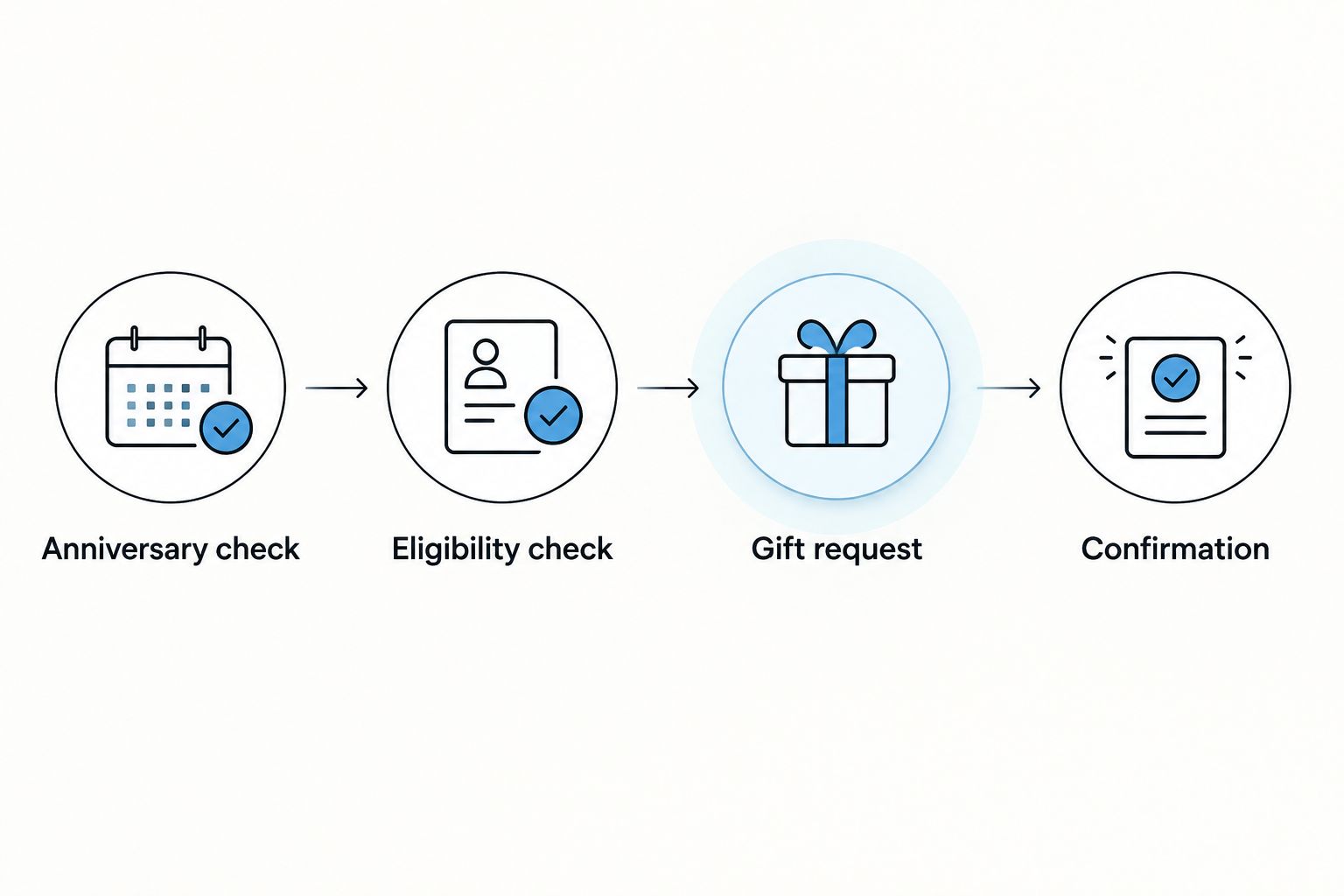
The core sequence is Anniversary check, Eligibility check, Gift request and Confirmation. Each stage should leave a record that the next stage can verify.
Update pending requests when an employee record changes
A record-change workflow is useful alongside the scheduled anniversary check. Its job is to keep pending requests accurate, not to discover every recurring anniversary.
When the authoritative service date changes, recalculate pending anniversaries and flag any milestone change for review. When employment status changes, reassess eligibility before an unsubmitted request advances.
For delivery-address changes, use the approved confirmation route. Do not automatically replace details on an accepted order without establishing whether a correction is still possible.
Update a pending request; do not create a fresh gift request for every record change. Preserve the original reference so HR can trace the decision.
This second workflow also needs a cut-off rule. Before submission, corrections can follow your internal approval process. After acceptance, route corrections to the person responsible for the supplier hand-off rather than assuming the original instruction can be reversed.
Troubleshooting
The anniversary never triggers
Check the trigger type first. An employee-record update will not fire merely because another year has passed. Use a scheduled date check or a documented native anniversary event, then verify the service date and timezone.
The employee receives duplicate requests
Check when the event key is stored. Save it before submission and make retries look up the existing request. Two workflows covering the same anniversary also need to share the duplicate check.
The request exists, but fulfilment has not started
Separate submission from acceptance. Check the agreed acknowledgement route and the request reference. Assign the investigation to a named owner rather than allowing an automatic retry to create another order.
The gift reaches the wrong destination
Review the address-confirmation step. Establish which address was approved and when. Suspend further requests using the same unverified source until HR has corrected the process.
Recognition is late despite a correct anniversary date
Check the planning window and approval delay. Work backwards from the required date using the supplier-agreed timetable. An approval task that remains unanswered needs escalation, not silent postponement.
Customise your workflow
Expand the workflow only after the anniversary process passes its test cases. Useful additions include manager message review, recipient gift preferences and a shared exception queue for other employee occasions.
Keep each occasion identifiable. An onboarding request and an anniversary request for the same employee are different events, even if they use the same delivery destination.
If your programme needs a personalised gifting portal or stored merchandise, ask how those arrangements would affect approval, recipient details and request tracking. Confirm the process before adding automation around it. Do not assume that a portal includes an HR connection or that stored items can be requested through any chosen tool.
Review access whenever responsibilities change. A former programme owner should not retain access to recipient addresses simply because the workflow still runs under their account.
FAQ
Can my HR system automatically send work anniversary gifts?
Yes, if your HR system supports a suitable trigger and you establish an accepted ordering route. Start with an anniversary check, eligibility rules and duplicate prevention; confirm the supplier hand-off before enabling orders.
Do I need a direct integration with the gift supplier?
No, a reviewed request hand-off can support an anniversary workflow without a direct integration. It retains a manual step, so assign responsibility for acceptance and exception handling.
Does the ethical gift box have a native HR integration?
Confirm the available ordering and integration arrangements directly with the ethical gift box. Do not configure a native HR connection without documentation confirming that it exists and supports your intended workflow.
What employee information should an anniversary gift request contain?
Include only the information needed for the agreed request, such as recipient name, confirmed destination, gift instructions and request reference. Keep unrelated HR records out of the supplier hand-off.
How do I stop the same anniversary gift being ordered twice?
Use a unique event key based on the employee identifier, anniversary date and gift programme. Save it before submission and check existing requests before retries or repeat runs.
Should the workflow trigger on the anniversary day?
Trigger early enough to meet the agreed fulfilment timetable if arrival on the anniversary matters. Calculate the planning window from the required date, including your approval and address-confirmation steps.
What happens if an employee changes address or leaves?
Recheck pending requests when relevant employee details change. After a request has been accepted, route corrections or cancellations through the agreed supplier process rather than assuming an automatic update will reverse it.
One last thing
An annual gifting schedule needs someone to own the exceptions, not someone to watch every date. Name that person before enabling the workflow, and give them a queue showing the reason, request reference and next action.
Related guides
- How to build an employee gifting strategy
- Corporate gift lead times: when should you place an order?
- How to gift remote teams
Before automating your anniversary programme, settle the milestone rules, recipient-detail process and fulfilment hand-off. Get in touch with the ethical gift box with your HR system name, expected gifting frequency, delivery countries and personalisation requirements to discuss a practical request process.